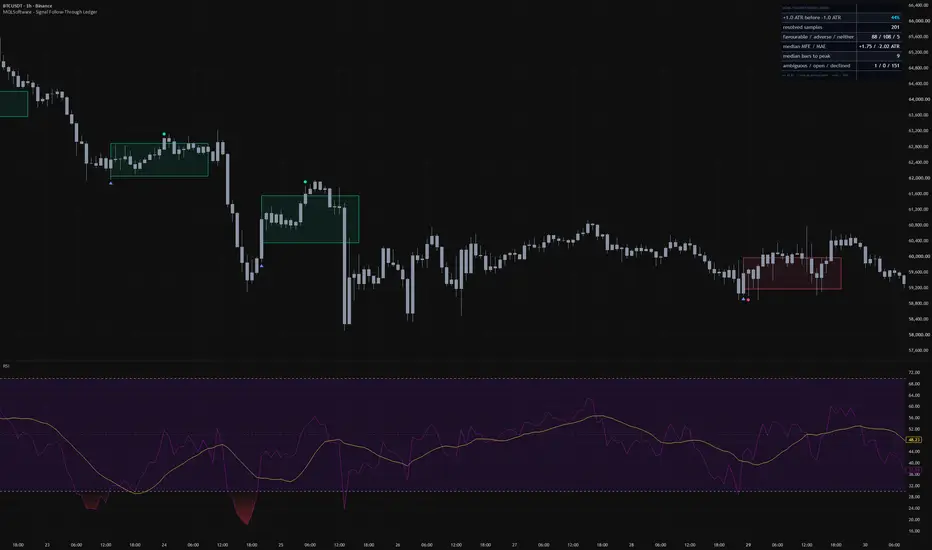
Signal Follow-Through Ledger does not create its own signals, entries, stops, or position sizing. It audits a signal you already use by keeping a structured record of what price did after each occurrence.
What it measures
You point the tool at any numeric plot on your chart — a price source, your own indicator, or a third-party indicator — and define what counts as an event. Each event opens one sample. The reference price is the close of the confirmed signal bar. Favourable and adverse distances are set from an ATR snapshot taken on that same bar and then frozen. Evaluation starts on the next bar and runs for a configurable horizon, twenty bars by default.
How to read the panel
The panel reports the share of samples that reached the favourable distance before the adverse one, always shown with the sample size. It also shows the favourable, adverse, and neither split, median MFE and MAE in ATR units, median bars to the peak, and separate ambiguous, still-open, and declined counts. A sample spanning both distances in one later bar is recorded as ambiguous and excluded from the headline figure. A sample reaching neither distance remains in the denominator.
A hypothetical example
Suppose you already follow an oscillator and want context on its past behaviour. You select that plot as the signal source and choose the matching event, such as a cross through a level or reference. As bars confirm, the ledger adds signal and outcome markers with a measurement corridor. Over time you can compare how often price moved favourably first, how large typical excursions were, and how often new events arrived while a sample was still open.
Practical setup
Open Settings and set Signal source to the plot you want to audit; the dropdown lists indicators already on your chart. Choose from seven event types, including crosses through a level, crosses through a moving average or second plot, new N-bar highs or lows, and first non-blank values. For level modes, enter the level in that source’s units. Out of the box it audits price crossing above its own fifty-bar average. Rates read as collecting until enough samples complete.
Important limitations
This is a measurement tool, not a strategy tester. It models no fills, spread, commission, slippage, sizing, or intrabar order. Results describe only the loaded bars on that symbol, timeframe, and source. Events and resolved outcomes are recorded on confirmed bars. MFE and MAE continue to accumulate through the full measurement horizon even after an outcome resolves. Changing history, settings, or a source that rewrites its past can change the reconstructed audit.
TradingView and MetaTrader setup
The Signal source dropdown described above is the TradingView workflow. The MT editions use MetaTrader source selection. On MT4, attach the indicator from Navigator and select Apply to in its properties; this package intentionally has no MT4 template. Follow INSTALL.txt for the available source choices in your terminal.
Platform and source
This guide describes the published TradingView edition. MetaTrader controls and chart appearance may differ; use the instructions included with that build.
Original MQLSoftware publication and current TradingView access. Guide reviewed against the public product description on 13 September 2026. Examples are illustrative, not performance results.
Download for MetaTrader 4 and 5
Download free MT4 + MT5 ZIP — no registration
Includes compiled indicators, installation instructions and available templates for Windows desktop MetaTrader. Extract the archive and follow INSTALL.txt. Enable DLL imports only for the trusted MQLSoftware indicator: it uses the Windows internet library for activation. No separate DLL is included.
Fresh builds are generated daily. This build: 5 October 2026 01:00 UTC; valid until 5 November 2026 01:00 UTC (31 days from build time). Downloading or sharing an older archive does not restart its term. Online activation and periodic checks are required. You may share or mirror the original ZIP unchanged, including its instructions. Return to this page for current builds.
ZIP size: 210546 bytes. SHA-256: Verify your download
0370913fff2ee56692584f65c43dee0afdff4dbbde024d053da01052835883bf